
Light Crown Photo Editor
Photo Collage MasterBeauty
4.28.31K Reviews
- Version
- 1.6.2
- Installs
- 1.00M
- Age Rating
- Everyone
Screenshots
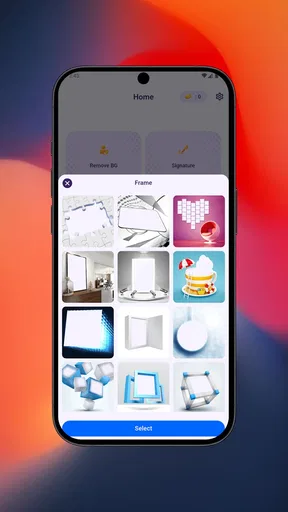
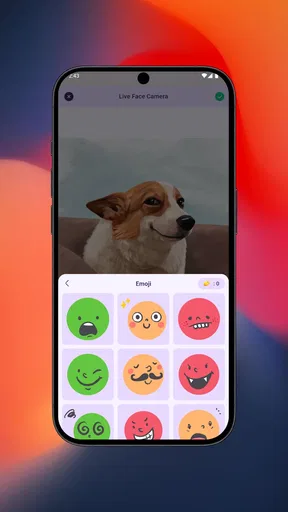
Our Review of Light Crown Photo Editor
 Analysis by Appyee
When several people share a phone or tablet, a photo editor can become a small group activity: one person chooses a portrait, another has an opinion about the glow, and someone else wants to see the finished image before it is saved. Light Crown Photo Editor is built around playful portrait decoration rather than careful, technical retouching, which makes it easy to pass around for a quick creative session. I’d treat it as a focused effects app, though, not as a shared family workspace: each person should choose their own photo and decide for themselves whether the edited version is something they want to keep or share.
Keeping a shared device comfortable to use
If I were setting it up on a device used by more than one person, I’d start with the practical boundary: open only the image you mean to edit, and check the result before saving or sending it. That is useful with any gallery-based editor, especially when personal pictures sit alongside photos that belong to other household members. A fun crown effect does not change who owns the original image, so I’d ask before editing or sharing someone else’s portrait.
The app is free to download, but it includes in-app purchases ranging from about fifty cents to around a hundred dollars per item. That is worth knowing before handing a shared device to a child or letting someone browse purchase screens. I would keep purchases under the device owner’s usual supervision rather than assume the editor has its own household or account controls. Its appeal is quick visual play; spending should remain a separate, deliberate choice.
A low-pressure activity, with clear expectations
For a casual evening at home, I can picture taking a well-lit portrait, trying a couple of crown designs, and letting everyone vote on which version feels most like the person in the photo. That works best when the goal is a silly keepsake or a themed image, not a polished family portrait. The automatic placement gives newcomers a simple first result, while the adjustable size and angle offer enough control for someone who wants to make the crown sit more naturally.
I would also agree on where the final image is going before anyone taps a sharing option. Sending a picture to a private conversation and posting it publicly are different decisions, and a playful edit can still reveal the person’s face or surroundings. Saving a version locally first gives the group a chance to look it over; it also avoids turning a quick experiment into an accidental post. That small pause is especially helpful when children are involved.
Who will enjoy it, and who may want another tool
This is a good fit for people who want a fast, decorative change without learning a full photo-editing workflow. It suits a themed selfie, a lighthearted birthday greeting, or a profile image where a fantasy accent is the point. It is less suitable if you need detailed skin retouching, precise cutouts, consistent edits across a batch of photos, or a restrained result that should look untouched. For those jobs, I’d choose a general-purpose editor with more control over individual adjustments, even if it takes longer to learn.
Compared with the usual beauty editors, Light Crown Photo Editor puts its identity in the crown effect rather than making broad portrait correction the main event. That focus is convenient when the crown is exactly what you want, but it can feel narrow if you arrive expecting a complete photography toolkit. I’d use it to explore a few expressive looks, then switch to a more flexible editor if I need to refine lighting, crop a series consistently, or prepare a carefully composed image for a professional purpose.
One useful way to avoid over-editing is to finish the portrait before adding decoration: choose the crop, check that the face is clearly visible, and only then test crown placement and glow. A crown that looks balanced on a close-up may feel oversized in a wider shot. I’d compare the effect against the unedited image as I work, because bright color and sparkle can quickly draw attention away from the person’s expression. The most convincing version is often not the strongest one.
What to check before keeping a result
Before sharing, I’d zoom in on the edges around the hair and forehead. Automatic placement can save time, but portraits with unusual angles, hats, loose hair, or several people may need more adjustment than a straightforward selfie. If the crown looks detached or overlaps a feature in an awkward way, changing its size or angle is more effective than piling on extra effects. A plain background and even lighting also make it easier to judge whether the decoration belongs in the scene.
It is also worth thinking about the destination. A playful image meant for a chat can tolerate a bolder filter than a photo you plan to use as a small profile picture, where fine details may be hard to see. I’d save only the version I actually like rather than keeping every experiment, and I’d review the final image at the size people will see it. That simple check helps keep the crown from overwhelming the face.
The app is a beauty editor from Photo Collage Master, with a 4.2 average from around 56,000 ratings and more than a million installs. It is free, rated for Everyone, and its current version is 1.6.2; it runs on Android 5.0 and later. Those details make it approachable for a broad range of Android devices, while the in-app purchase range is a sensible reason to supervise use on a shared device. Its modest, specific purpose is clearer than the promise of being an all-purpose editing studio.
For household use, I’d keep the arrangement simple: one person chooses the picture, the person shown gets a say, and everyone checks the finished edit before it leaves the device. There is no need to turn a quick creative activity into a complicated workflow, but a little coordination protects privacy and avoids confusion over whose photo is being changed. That approach also makes the app easier to enjoy across different ages and comfort levels.
Have you ever scrolled through Instagram and stumbled upon those dreamy photos with glowing crowns and wondered how on earth they did that? Well, I’ve got the scoop for you. Let me introduce you to the Light Crown Photo Editor. I spent some time playing around with it, and let me tell you, this app is a total game-changer for anyone looking to add a little magic to their photos.
First Impressions and Getting Started
When I first downloaded the Light Crown Photo Editor, I was immediately drawn in by its sleek and user-friendly interface. It’s one of those apps that doesn’t require you to be a tech genius to figure out. I just jumped right in, and within minutes, I was transforming my selfies into dazzling works of art. The app didn’t waste time with lengthy tutorials or unnecessary sign-ups, which was a breath of fresh air.
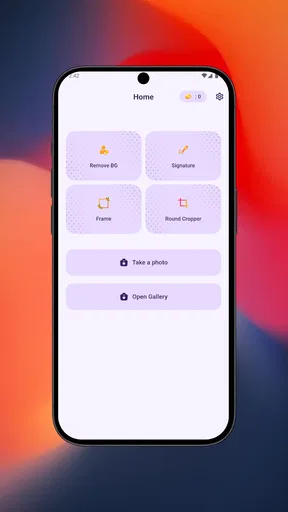
Opening the app, you’re greeted with a straightforward menu. You can either snap a new photo or dive into your gallery. I decided to test it on a selfie I had taken earlier that day. The app quickly loaded my photo and presented me with a plethora of editing options.
The Magic of Light Crowns
Now, let’s talk about what makes this app shine - the light crowns. There are several styles to choose from, ranging from delicate halos to bold, glowing crowns that look like they’re straight out of a fantasy movie. All I had to do was select the style I liked, and the app did the rest. The crown automatically positioned itself on my head, and I could easily adjust its size and angle. It’s almost like the app knew exactly where to place it, making the process smooth and hassle-free.
What I loved most was the customization. You can tweak the brightness, color, and even the intensity of the glow. I spent a good amount of time playing with these settings to get that perfect ethereal look I was going for. The app also allows you to layer multiple effects, so I went ahead and added a soft sparkle effect to complete the look.
Beyond Crowns: Additional Features
While the light crowns are the star of the show, the app offers way more. There’s an assortment of filters that can give your photos a vintage vibe or a modern twist. I found myself particularly fond of the ‘Mystic’ filter, which added a subtle dreamy haze over my photo.
Another nifty feature is the background editor. You can blur the backdrop to make your crown pop, or swap it out entirely for something more dramatic. I tried a few different backgrounds and settled on a soft, pastel sky that complemented the crown perfectly.
Sharing the Magic
Once I was satisfied with my masterpiece, it was time to share it with the world. The app provides seamless integration with social media platforms. I could directly upload my photo to Instagram, Facebook, or even send it via WhatsApp with just a tap. I appreciated how the app maintained the quality of my photo, making sure every detail of the crown was as crisp and vibrant as it was on my screen.
For those who love to keep their creations private, the app also allows you to save the edited photo directly to your device. I ended up saving a few versions because, honestly, they were just too cool not to.
Final Thoughts
All in all, the Light Crown Photo Editor is a delightful app that brings a touch of magic to your photos. It’s easy to use, packed with features, and perfect for anyone who loves to experiment with their photography. Whether you’re an amateur or a seasoned pro, this app has something for everyone. So, if you’re looking to add an enchanting twist to your selfies or just want to have some fun with your photos, give Light Crown Photo Editor a try. Trust me, you won’t be disappointed.
Verdict
Strengths of Light Crown Photo Editor
- Intuitive interface simplifies editing.
- Wide range of filters and effects.
- Quick sharing to social media.
- Non-destructive editing features.
- High-resolution export options.
Limitations of Light Crown Photo Editor
- Contains in-app purchases.
- Some features require internet.
- Occasional ad interruptions.
- Limited free version features.
- Resource-intensive for older devices.
Similar Picks in This Category
View All
Beauty Makeup Editor & Camera
Photo & Video Editors - Instant Solution4.7

Perfect365: Face Makeup Editor
Perfect365, Inc.3.5

Mirror Plus - HD Mirror app
Digitalchemy, LLC4.8

Cute Lock Screen & Wallpapers
Prometheus Interactive LLC4.6

HD Camera for Android
One Music Player4.5

Phone Mirror app - True Mirror
Cards4.6
Frequently Asked Questions
What features does Light Crown Photo Editor offer?
Light Crown Photo Editor provides a range of features including a variety of light crown effects, filters, and editing tools to enhance photos. Users can adjust brightness, contrast, and saturation to create stunning visuals. The app also supports social media sharing, making it easy to post your edited photos directly to your favorite platforms.
Is Light Crown Photo Editor free to use?
The app offers a free version with basic features. However, to access advanced tools and a wider range of effects, users may need to purchase a subscription or make in-app purchases. This allows for a more comprehensive editing experience, unlocking premium filters and exclusive content.
Can Light Crown Photo Editor be used offline?
Yes, Light Crown Photo Editor can be used offline. Once the app and any necessary resources are downloaded, users can edit their photos without an internet connection. However, certain features, like downloading new effects or sharing photos on social media, will require connectivity.
Is Light Crown Photo Editor user-friendly for beginners?
Light Crown Photo Editor is designed with an intuitive interface, making it accessible for beginners. The app includes step-by-step tutorials and tips to help new users get started. Whether you're new to photo editing or experienced, the app provides a smooth and enjoyable editing process.
What devices support Light Crown Photo Editor?
Light Crown Photo Editor is compatible with both Android and iOS devices. The app is optimized for smartphones and tablets, ensuring a seamless experience across different screen sizes. Users should ensure they have the latest OS version for optimal performance and access to all features.
